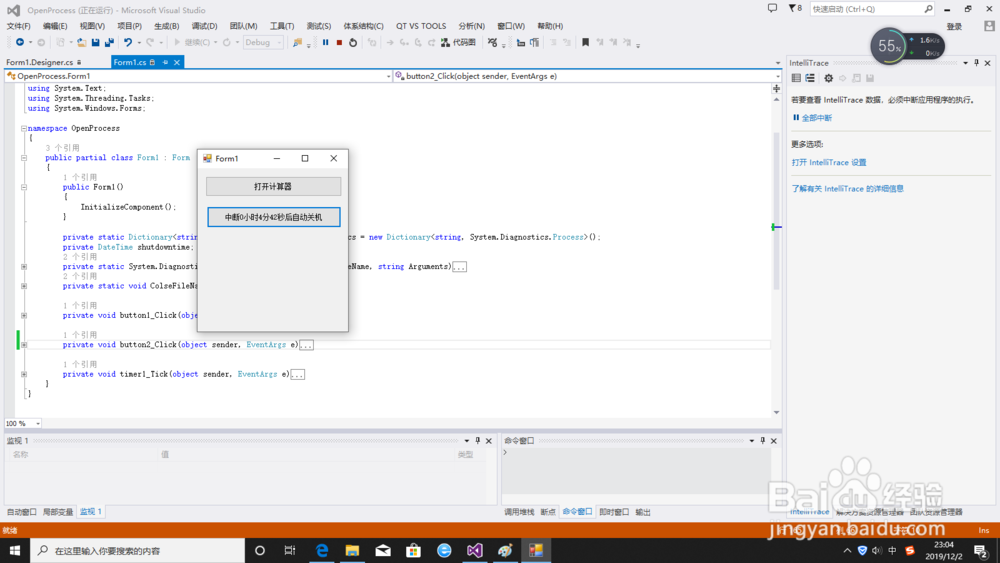
C#利用Process打开关闭外部程序
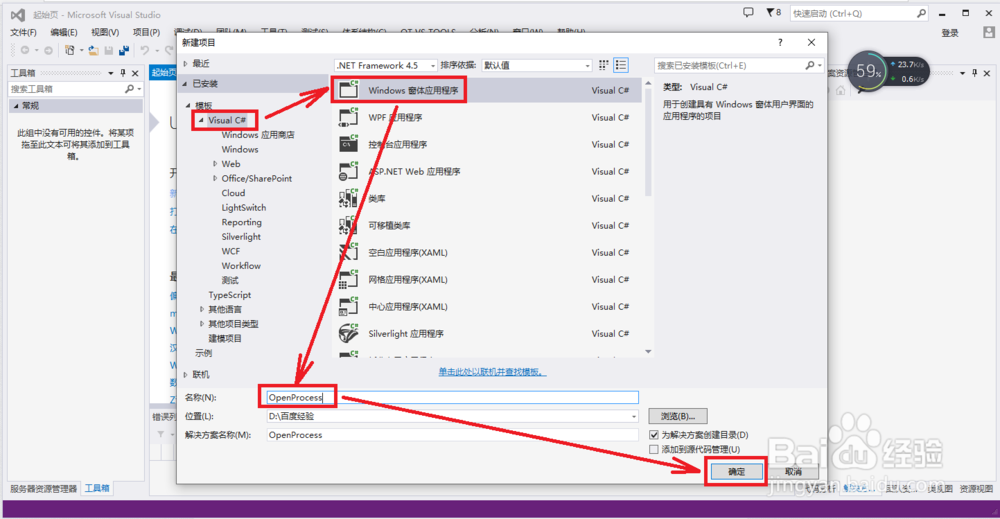
1、新建一个WinForm工程。点击【新建项目】弹出新建项目窗口,在C#模板下选择【WinForm应用程序】,输入项目名称:OpenProcess,点击【确定】
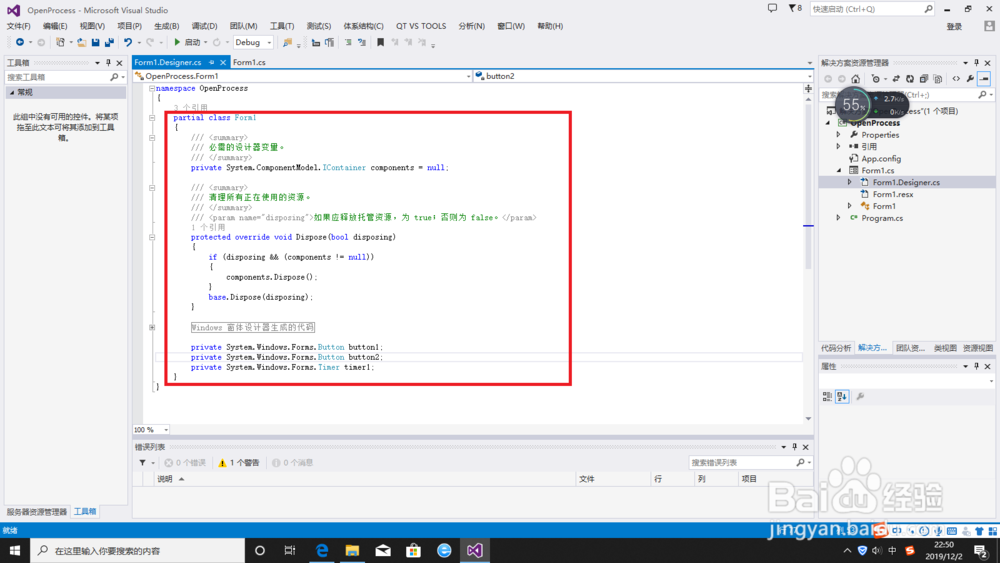
2、在Form1.Designer.cs页面中找到 partial class Form1{……}整段代码,即图中框选区域代码,用下面代码进行替换。
partial class Form1
{
/// <summary>
/// 必需的设计器变量。
/// </summary>
private System.ComponentModel.IContainer components = null;
/// <summary>
/// 清理所有正在使用的资源。
/// </summary>
/// <param name="disposing">如果应释放托管资源,为 true;否则为 false。</param>
protected override void Dispose(bool disposing)
{
if (disposing && (components != null))
{
components.Dispose();
}
base.Dispose(disposing);
}
#region Windows 窗体设计器生成的代码
/// <summary>
/// 设计器支持所需的方法 - 不要
/// 使用代码编辑器修改此方法的内容。
/// </summary>
private void InitializeComponent()
{
this.components = new System.ComponentModel.Container();
this.button1 = new System.Windows.Forms.Button();
this.button2 = new System.Windows.Forms.Button();
this.timer1 = new System.Windows.Forms.Timer(this.components);
this.SuspendLayout();
//
// button1
//
this.button1.Location = new System.Drawing.Point(13, 13);
this.button1.Name = "button1";
this.button1.Size = new System.Drawing.Size(218, 32);
this.button1.TabIndex = 0;
this.button1.Text = "打开计算器";
this.button1.UseVisualStyleBackColor = true;
this.button1.Click += new System.EventHandler(this.button1_Click);
//
// button2
//
this.button2.Location = new System.Drawing.Point(15, 61);
this.button2.Name = "button2";
this.button2.Size = new System.Drawing.Size(215, 34);
this.button2.TabIndex = 1;
this.button2.Text = "启动自动关机";
this.button2.UseVisualStyleBackColor = true;
this.button2.Click += new System.EventHandler(this.button2_Click);
//
// timer1
//
this.timer1.Tick += new System.EventHandler(this.timer1_Tick);
//
// Form1
//
this.AutoScaleDimensions = new System.Drawing.SizeF(6F, 12F);
this.AutoScaleMode = System.Windows.Forms.AutoScaleMode.Font;
this.ClientSize = new System.Drawing.Size(241, 261);
this.Controls.Add(this.button2);
this.Controls.Add(this.button1);
this.Name = "Form1";
this.Text = "Form1";
this.ResumeLayout(false);
}
#endregion
private System.Windows.Forms.Button button1;
private System.Windows.Forms.Button button2;
private System.Windows.Forms.Timer timer1;
}
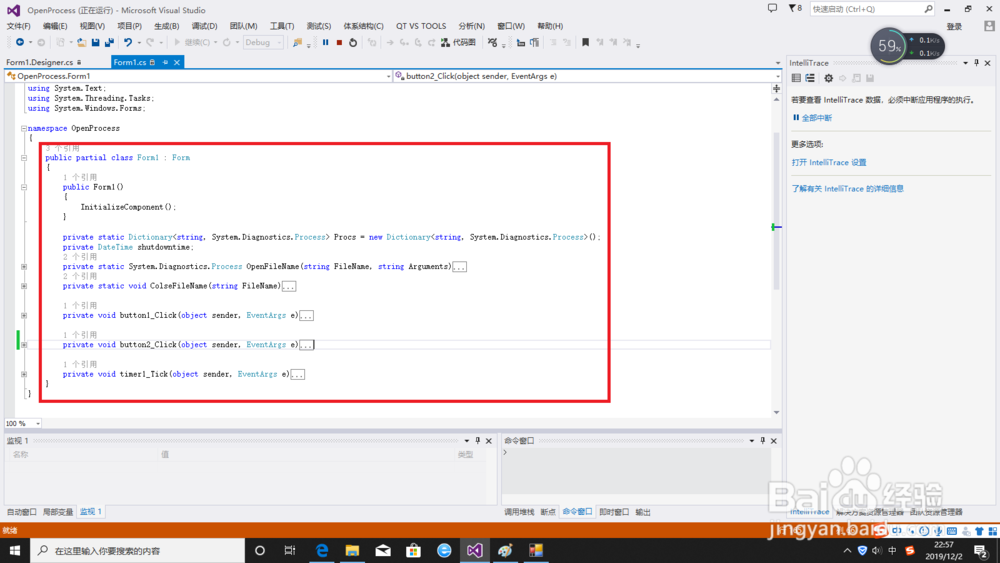
3、在Form1页面中找到public partial class Form1 : Form{……}整段代码,即图中框选区域代码,用下面代码进行替换。
public partial class Form1 : Form
{
public Form1()
{
InitializeComponent();
}
private static Dictionary<string, System.Diagnostics.Process> Procs = new Dictionary<string, System.Diagnostics.Process>();
private DateTime shutdowntime;
private static System.Diagnostics.Process OpenFileName(string FileName, string Arguments)
{
System.IO.FileInfo f = new System.IO.FileInfo(FileName);
if (!f.Exists)
{
return null;
}
FileName = f.FullName;
string WorkingDirectory = System.IO.Path.GetDirectoryName(f.FullName);
string filename = f.Name;
//声明一个程序信息类
System.Diagnostics.ProcessStartInfo Info = new System.Diagnostics.ProcessStartInfo();
//设置外部程序名
Info.FileName = filename;
//设置外部程序的启动参数(命令行参数)为test.txt
Info.Arguments = Arguments;
//设置外部程序工作目录为 C:\
Info.WorkingDirectory = WorkingDirectory;
try
{
//声明一个程序类
//
//启动外部程序
//
if (!Procs.ContainsKey(FileName))
{
Procs[FileName] = System.Diagnostics.Process.Start(Info);
}
else
{
try
{
DateTime dt = Procs[FileName].ExitTime;
DateTime now = DateTime.Now;
TimeSpan ts = now - dt;
if (ts.Milliseconds > 0)
{
Procs[FileName] = System.Diagnostics.Process.Start(Info);
}
}
catch
{
}
}
}
catch (System.ComponentModel.Win32Exception ea)
{
return null;
}
return Procs[FileName];
}
private static void ColseFileName(string FileName)
{
System.IO.FileInfo f = new System.IO.FileInfo(FileName);
if (!f.Exists)
{
return;
}
FileName = f.FullName;
System.Diagnostics.Process Proc = null;
if (Procs.ContainsKey(FileName))
{
Proc = Procs[FileName];
}
else
{
//没有关联启动程序
return;
}
//打印出外部程序的开始执行时间
//Console.WriteLine("外部程序的开始执行时间:{0}", Proc.StartTime);
DateTime StartTime = Proc.StartTime;
DateTime now = DateTime.Now;
TimeSpan ts = now - StartTime;
if (ts.Milliseconds < 3000)
{
//System.Windows.Forms.MessageBox.Show("操作过于频繁,程序启动不足3秒钟");
//等待3秒钟
//Proc.WaitForExit(3000);
}
//如果这个外部程序没有结束运行则对其强行终止
if (Proc.HasExited == false)
{
//Console.WriteLine("由主程序强行终止外部程序的运行!");
Proc.Kill();
}
else
{
//Console.WriteLine("由外部程序正常退出!");
}
//Console.WriteLine("外部程序的结束运行时间:{0}", Proc.ExitTime);
//Console.WriteLine("外部程序在结束运行时的返回值:{0}", Proc.ExitCode);
bool ExitYes = true;
while (ExitYes)
{
try
{
DateTime dt = Procs[FileName].ExitTime;
now = DateTime.Now;
ts = now - dt;
if (ts.Milliseconds > 50)
{
ExitYes = false;
Procs.Remove(FileName);
}
}
catch
{
//System.Threading.Thread.Sleep(100);
}
}
}
private void button1_Click(object sender, EventArgs e)
{
if (button1.Text == "打开计算器")
{
OpenFileName(@"C:\Windows\System32\Calc.exe", "");
button1.Text = "关闭计算器";
}
else
{
ColseFileName(@"C:\Windows\System32\Calc.exe");
button1.Text = "打开计算器";
}
}
private void button2_Click(object sender, EventArgs e)
{
if (button2.Text == "启动1小时后自动关机")
{
OpenFileName(@"C:\Windows\System32\shutdown.exe", "-s -t 3600");
button2.Text = "中断1小时后自动关机";
this.shutdowntime = DateTime.Now+new TimeSpan(1,0,0) ;
timer1.Enabled = true;
}
else
{
timer1.Enabled = false;
ColseFileName(@"C:\Windows\System32\shutdown.exe");
button2.Text = "启动1小时后自动关机";
}
}
private void timer1_Tick(object sender, EventArgs e)
{
TimeSpan tp= this.shutdowntime-DateTime.Now;
string str= tp.Hours.ToString ()+"小时"+ tp.Minutes .ToString ()+"分"+tp.Seconds .ToString ()+"秒";
button2.Text = "中断"+str+"后自动关机";
}
}
4、编译代码,生成解决方案。按F5执行
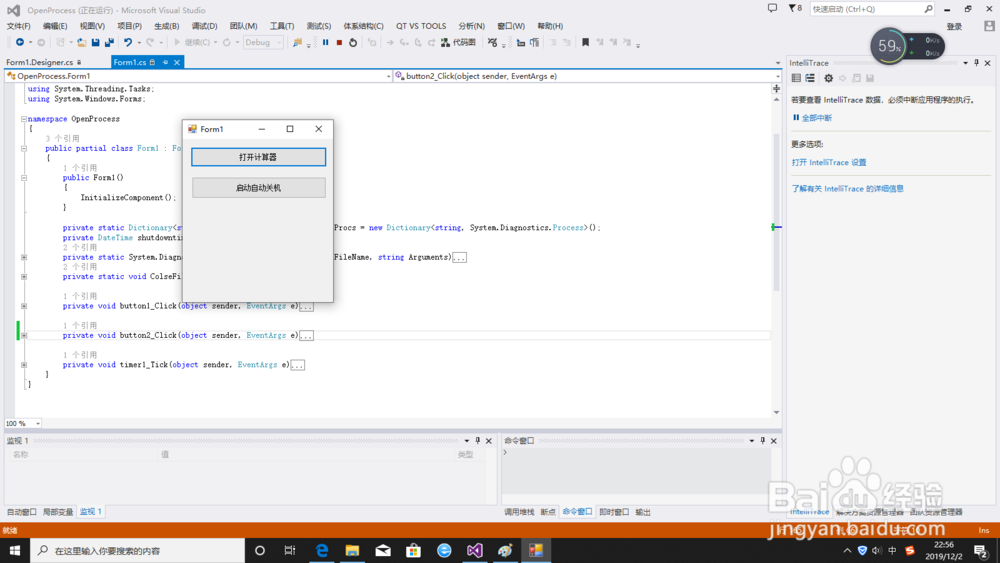
5、点击【打开计算器】,可以发现计算器被打开,然后点击【关闭计算器】,计算器程序则被关闭
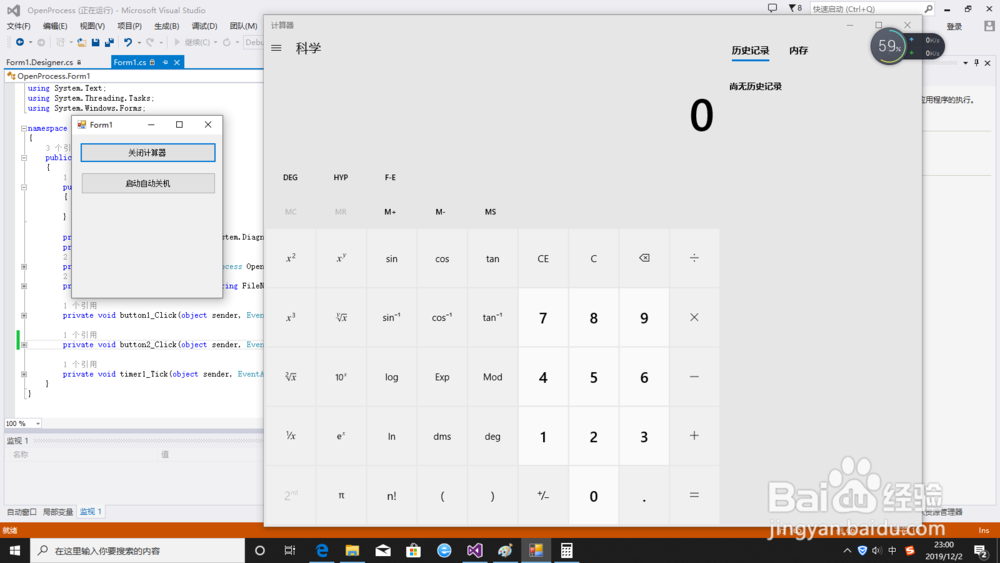
6、点击【启动自动关机】,计算机将在1小时后自动关机。