windows 7 下Rust 入门 Helloworld 怎么编写
1、首先要在 电脑上安装 rust 语言,具体可参考
2、打开一个编辑器,我用的是 Notepad ++ ,其他也可以,建议初学 最好用 文本编辑器,不要用什么IDE
3、输入代码:
// This is a comment, and will be ignored by the compiler
// 本行为注释,会被编译器忽略
// This is the main function
// 这是主函数
fn main() {
println!("Hello World!");
}

4、输入无误后,保存为 "hello.rs", 注意文件后缀是 .rs
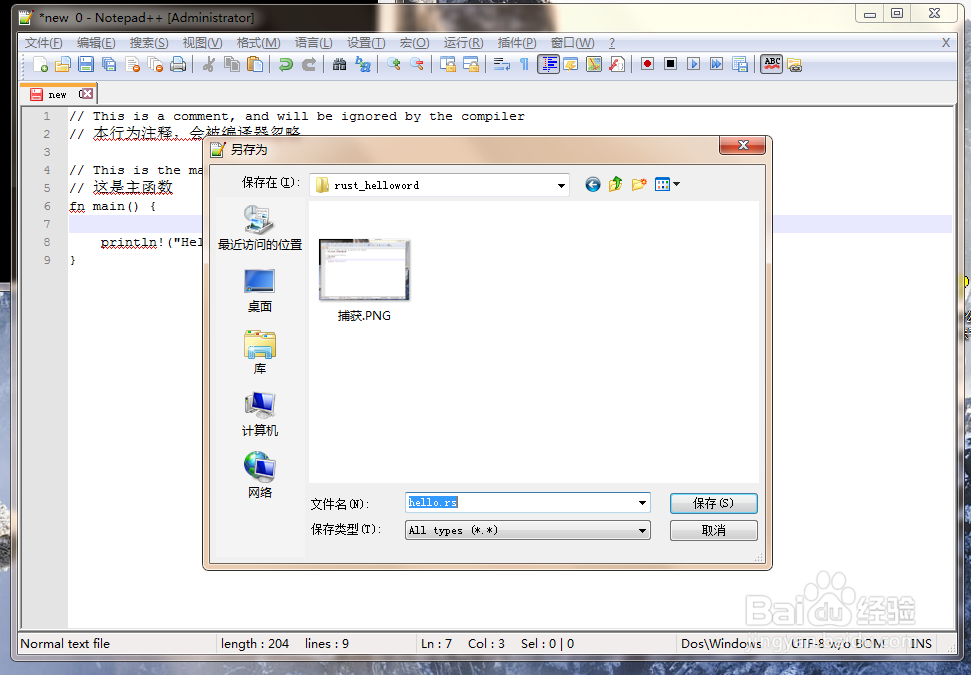
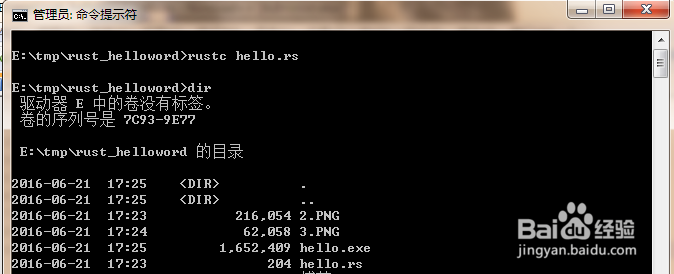
5、打开一个 COMMAND, 转到 文件保存目录,输入 rustc hello.rs,回车。

6、如果源代码没有写错的话,就会生成 hello.exe 文件
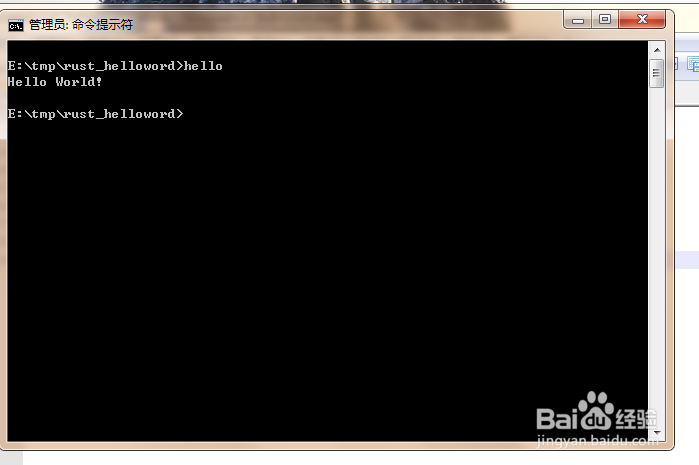
7、验证结果 ,在COMMAND 中 直接 输入 hello.exe
如果 显示 hello world,表示编写成功
8、rust 编程还是比较简单容易上手的。
声明:本网站引用、摘录或转载内容仅供网站访问者交流或参考,不代表本站立场,如存在版权或非法内容,请联系站长删除,联系邮箱:site.kefu@qq.com。
阅读量:73
阅读量:86
阅读量:30
阅读量:56
阅读量:99