Cisco静态路配置,怎么设置静态路协议
Cisco静态路配置,怎么设置静态路协议?
费话不多说了,直接看图演示:
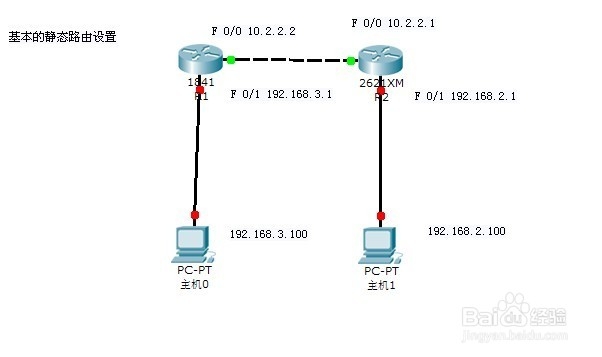
图如示:
R1: f 0/0 10.2.2.2 255.0.0.0;
f 0/1 192.168.3.1 255.255.255.0;
R2: f 0/0 10.2.2.1 255.0.0.0;
f 0/1 192.168.2.1 255.255.255.0;
PC0: 192.168.3.100 255.255.255.0
PC1:192.168.2.100 255.255.255.0
相关设备基本配置信息,命令操作如下:
R1:
R1#conf tEnter configuration commands, one per line. End with CNTL/Z.R1(config)#intR1(config)#interface f 0/0R1(config)#interface f 0/0R1(config-if)#ip addR1(config-if)#ip address 10.2.2.2 255.0.0.0R1(config-if)#no shutdown
R1(config)#int fastEthernet 0/1R1(config-if)#ip addR1(config-if)#ip address 192.168.3.1 255.255.255.0R1(config-if)#no shuR1(config-if)#no shutdown
R2(config-if)#cdp run
R1(config-if)#end
OK,类同R2也是一样的;接下来测试PC与路由之间的接通性:
R1#ping 192.168.3.100Type escape sequence to abort.Sending 5, 100-byte ICMP Echos to 192.168.3.100, timeout is 2 seconds:.!!!!Success rate is 80 percent (4/5), round-trip min/avg/max = 2/2/2 ms
R2#ping 192.168.2.100Type escape sequence to abort.Sending 5, 100-byte ICMP Echos to 192.168.2.100, timeout is 2 seconds:.!!!!Success rate is 100 percent (5/5), round-trip min/avg/max = 2/2/2 ms
可以看到PING通了;接下来做静态路由:LOOK
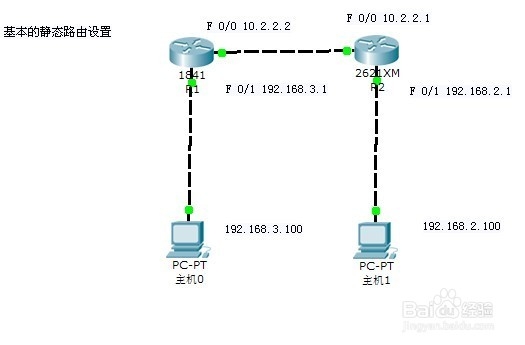
R1:
Router#conf tEnter configuration commands, one per line. End with CNTL/Z.R1(config)#ip rouR1(config)#ip route 192.168.2.0 255.255.255.0 10.2.2.1R1#show ip route
Gateway of last resort is not setC 10.0.0.0/8 is directly connected, FastEthernet0/0S 192.168.2.0/24 [1/0] via 10.2.2.1C 192.168.3.0/24 is directly connected, FastEthernet0/1
R2:
Router#conf tEnter configuration commands, one per line. End with CNTL/Z.R2(config)#ip rouR2(config)#ip route 192.168.2.0 255.255.255.0 10.2.2.1R2#show ip route
Gateway of last resort is not setC 10.0.0.0/8 is directly connected, FastEthernet0/0C 192.168.2.0/24 is directly connected, FastEthernet0/1S 192.168.3.0/24 [1/0] via 10.2.2.2
然后 我们来测试:
R1:
Router#ping 192.168.2.1Type escape sequence to abort.Sending 5, 100-byte ICMP Echos to 192.168.2.1, timeout is 2 seconds:!!!!!Success rate is 100 percent (5/5), round-trip min/avg/max = 31/31/32 ms
OK通了;
R2:
Router#ping 192.168.3.1Type escape sequence to abort.Sending 5, 100-byte ICMP Echos to 192.168.3.1, timeout is 2 seconds:!!!!!Success rate is 100 percent (5/5), round-trip min/avg/max = 31/31/32 m
OK也通了;
PC0上测试:
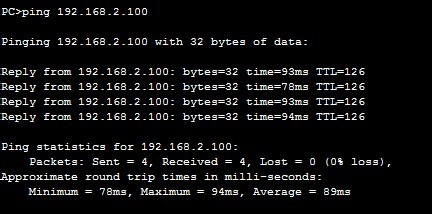
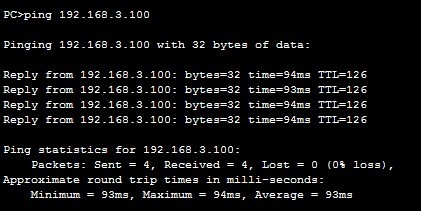
PC1上测试:
总结:静态路由是很容易的路由协议,也是最基本的,只要了解了这个路由协议,那么以后在学习路由协议上就轻松多了;现大家都知道Cisco静态路配置,怎么设置静态路协议了吗!