poi excel如何设置水印透明度
1、第一步:使用idea创建springboot项目。
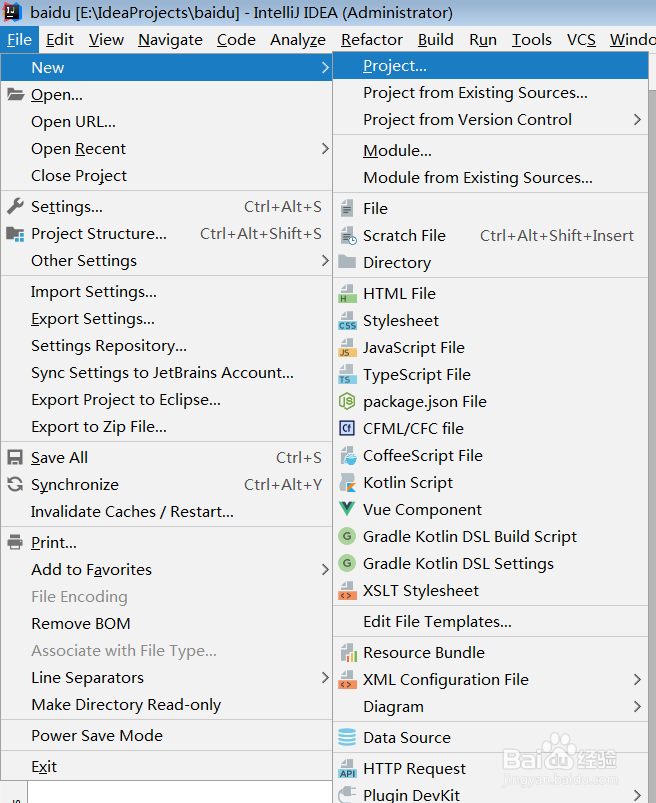
1、 打开创建页面 选择File-new-project..
2、选择创建的项目为spring initializr 进入springboot项目创建步骤(也可以选择类型java,创建一个普通java项目)
3、输入项目名字,选择依赖web(根据项目需求选择,此次需要),选择存放目录-完成(Finish)


2、第二步:在pom.xml文件中引入poi依赖架包。
<!--引入poi-->
<dependency>
<groupId>org.apache.poi</groupId>
<artifactId>poi</artifactId>
<version>4.0.0</version>
</dependency>
<dependency>
<groupId>org.apache.poi</groupId>
<artifactId>poi-ooxml</artifactId>
<version>4.0.0</version>
</dependency>

1、第一步:编写打印水印工具类
import java.awt.image.BufferedImage;
import java.io.ByteArrayOutputStream;
import java.io.FileInputStream;
import java.io.IOException;
import java.io.InputStream;
import javax.imageio.ImageIO;
import org.apache.poi.ss.usermodel.ClientAnchor;
import org.apache.poi.ss.usermodel.Drawing;
import org.apache.poi.ss.usermodel.Picture;
import org.apache.poi.ss.usermodel.Sheet;
import org.apache.poi.ss.usermodel.Workbook;
public class ExcelWaterRemarkUtils {
/**
* 为Excel打上水印工具函数 请自行确保参数值,以保证水印图片之间不会覆盖。 在计算水印的位置的时候,并没有考虑到单元格合并的情况,请注意
*
* @param wb
* Excel Workbook
* @param sheet
* 需要打水印的Excel
* @param waterRemarkPath
* 水印地址,classPath,目前只支持png格式的图片,
* 因为非png格式的图片打到Excel上后可能会有图片变红的问题,且不容易做出透明效果。
* 同时请注意传入的地址格式,应该为类似:"\\excelTemplate\\test.png"
* @param startXCol
* 水印起始列
* @param startYRow
* 水印起始行
* @param betweenXCol
* 水印横向之间间隔多少列
* @param betweenYRow
* 水印纵向之间间隔多少行
* @param XCount
* 横向共有水印多少个
* @param YCount
* 纵向共有水印多少个
* @param waterRemarkWidth
* 水印图片宽度为多少列
* @param waterRemarkHeight
* 水印图片高度为多少行
* @throws IOException
*/
public static void putWaterRemarkToExcel(Workbook wb, Sheet sheet,
String waterRemarkPath, int startXCol, int startYRow,
int betweenXCol, int betweenYRow, int XCount, int YCount,
int waterRemarkWidth, int waterRemarkHeight) throws IOException {
// 校验传入的水印图片格式
if (!waterRemarkPath.endsWith("png")
&& !waterRemarkPath.endsWith("PNG")) {
throw new RuntimeException("向Excel上面打印水印,目前支持png格式的图片。");
}
// 加载图片
ByteArrayOutputStream byteArrayOut = new ByteArrayOutputStream();
InputStream imageIn = new FileInputStream(waterRemarkPath);
// Thread.currentThread().getContextClassLoader().getResourceAsStream(waterRemarkPath);
if (null == imageIn || imageIn.available() < 1) {
throw new RuntimeException("水印图片为空!");
}
BufferedImage bufferImg = ImageIO.read(imageIn);
if (null == bufferImg) {
throw new RuntimeException("水印read未获取BufferedImage!");
}
ImageIO.write(bufferImg, "png", byteArrayOut);
// 开始打水印
Drawing drawing = sheet.createDrawingPatriarch();
// 按照共需打印多少行水印进行循环
for (int yCount = 0; yCount < YCount; yCount++) {
// 按照每行需要打印多少个水印进行循环
for (int xCount = 0; xCount < XCount; xCount++) {
// 创建水印图片位置
int xIndexInteger = startXCol + (xCount * waterRemarkWidth)
+ (xCount * betweenXCol);
int yIndexInteger = startYRow + (yCount * waterRemarkHeight)
+ (yCount * betweenYRow);
/*
* 参数定义: 第一个参数是(x轴的开始节点); 第二个参数是(是y轴的开始节点); 第三个参数是(是x轴的结束节点);
* 第四个参数是(是y轴的结束节点); 第五个参数是(是从Excel的第几列开始插入图片,从0开始计数);
* 第六个参数是(是从excel的第几行开始插入图片,从0开始计数); 第七个参数是(图片宽度,共多少列);
* 第8个参数是(图片高度,共多少行);
*/
ClientAnchor anchor = drawing.createAnchor(0, 0, 1023, 255,
xIndexInteger, yIndexInteger, waterRemarkWidth,
waterRemarkHeight);
Picture pic = drawing.createPicture(anchor, wb.addPicture(
byteArrayOut.toByteArray(), Workbook.PICTURE_TYPE_PNG));
pic.resize();
}
}
}
}


2、第二步:测试类。
import com.example.excelimport.poi.util.ExcelWaterRemarkUtils;
import org.apache.poi.hssf.usermodel.HSSFWorkbook;
import org.apache.poi.ss.usermodel.*;
import java.io.File;import java.io.FileOutputStream;
import java.util.UUID;
public class POITest {
public static void main(String[] args) throws Exception {
Workbook wb = new HSSFWorkbook();
//2.创建表格的sheet页
Sheet sheet = wb.createSheet();
//3.创建行
Row row = sheet.createRow(6);
//4.1创建列
Cell cell = row.createCell(3);
//4.2设置列宽便于展示
sheet.setColumnWidth(3, 10000);
//5设置内容
cell.setCellValue("有困难找度娘");
//6.设置样式
//6.1创建字体
Font font = wb.createFont();
font.setFontHeightInPoints((short) 36);
font.setFontName("华文琥珀");
font.setColor((short) 6);
//6.2创建单元格格式CellStyle
CellStyle cellStyle = wb.createCellStyle();
cellStyle.setFont(font);
//6.3字体作用单元格
cell.setCellStyle(cellStyle);
//插入水印
ExcelWaterRemarkUtils.putWaterRemarkToExcel(wb, sheet, "E:\\图片\\1.png", 1, 1, 0, 0, 1, 1 , 30, 30);
//加密
sheet.protectSheet(UUID.randomUUID().toString());
//7.写入到硬盘
//7.1创建流
FileOutputStream os = new FileOutputStream(new File("E:/file/export.xls"));
//7.2将wb的内容写入字符流中
wb.write(os);
//7.3关流
os.flush();
os.close();
}
}


1、运行主函数main
水印图片如下所示:
水印图片的透明度在制作的时候设置:
https://jingyan.baidu.com/article/3d69c5511ff272f0cf02d71b.html

