XSL最全基础教程之xsl:template元素
1、<xsl:template> 元素
<xsl:template> 元素主要用于构造模板,模板是XSLT文件的重要组成部分,其他XSLT元素必须放到模板里,内容如下:
<xsl:template
name=Qname
match=Pattern
priority=number
mode=QName>
</xsl:template>
2、属性
name(可选):
该属性为模板定义名称。如果名称具有前缀,前缀后必须加有效的命名空间声明,即统一资源标示符(URI)引用。
<xsl:template> 元素中name属性和match属性至少有一个。
match(可选):
该属性为模板的匹配模式,其属性值是XPath表达式。
<xsl:template> 元素中match属性和name属性至少有一个。
priority(可选):
该属性为模板的优先级编号,此属性值是0-9的实数帮眠,允许使用正负数,这个属性用的较少。
mode(可选):
该属性为模板规定模式。 使用mode可以允许xsl多次处理匹配相同的节点,输出不同的结果。<xsl:template>中没有match属性,就不能有mode属性。
xsl匹配的相同节点中,<xsl:apply-templates>设置mode值,xsl解析器会在上下文中会找到相同mode值的<xsl:template>模板。
3、创建XML文件
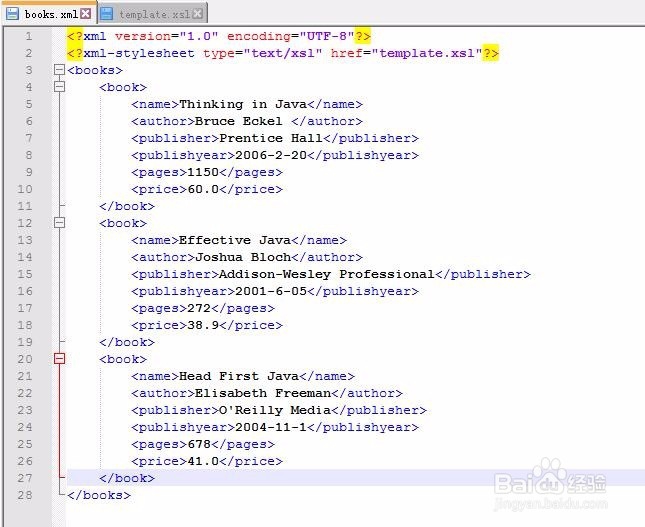
创建一个名为books.xml文件,具体内容如下:
<?xml version="1.0" encoding="UTF-8"?>
<?xml-stylesheet type="text/xsl" href="template.xsl"?>
<books>
<book>
<name>Thinking in Java</name>
<author>Bruce Eckel </author>
<publisher>Prentice Hall</publisher>
<publishyear>2006-2-20</publishyear>
<pages>1150</pages>
<price>60.0</price>
</book>
<book>
<name>Effective Java</name>
<author>Joshua Bloch</author>
<publisher>Addison-Wesley Professional</publisher>
<publishyear>2001-6-05</publishyear>
<pages>272</pages>
<price>38.9</price>
</book>
<book>
<name>Head First Java</name>
<author>Elisabeth Freeman</author>
<publisher>O'Reilly Media</publisher>
<publishyear>2004-11-1</publishyear>
<pages>678</pages>
<price>41.0</price>
</book>
</books>
分析:<?xml version="1.0" encoding="UTF-8"?>是xml文件的声明,<?xml-stylesheet type="text/xsl" href="template.xsl"?>引用xsl样式表。
4、创建XSL文件
<?xml version="1.0" encoding="UTF-8"?>
<xsl:stylesheet version="1.0" xmlns:xsl="http://www.w3.org/1999/XSL/Transform">
<xsl:template match="book">
<html>
<head>
<title>测试xsl:template元素</title>
</head>
<body>
<div style="font-weight:bold">
name:<xsl:value-of select="name"/><br/>
price:<xsl:value-of select="price"/><br/>
</div>
物炼 </body>
菌速亲 </html>
</xsl:template>
</xsl:stylesheet>
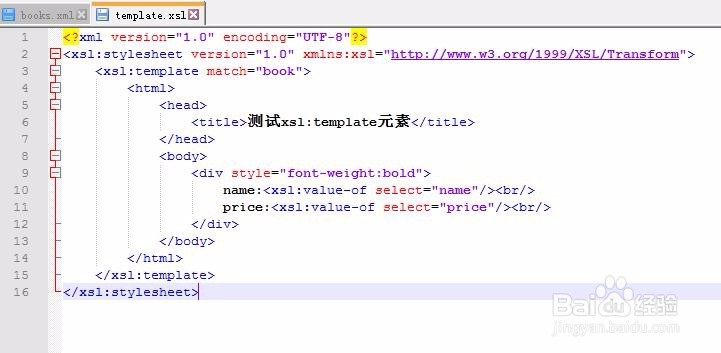
分析:<xsl:stylesheet version="1.0" xmlns:xsl="http://www.w3.org/1999/XSL/Transform">是标准的W3C声明。
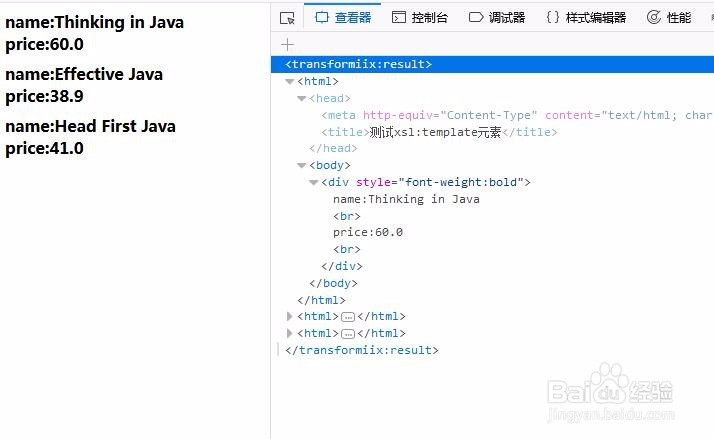
5、运行结果
用Firefox打开books.xml文件,运行结果见下图:
注意:测试方法见经验引用
6、深入理解mode属性示例
创建一个名为animals.xml文件
<?xml version="1.0" encoding="UTF-8"?>
<?xml-stylesheet type="text/xsl" href="animals.xsl"?>
<animals>
<animal>
<name>cat</name>
<property>self-indulgence</property>
</animal>
<animal>
<name>dog</name>
<property>loyalty</property>
</animal>
<animal>
<name>tortoise</name>
<property>indifference</property>
</animal>
<animal>
<name>rabbit</name>
<property>cute</property>
</animal>
</animals>

7、创建一个名为animals.xsl文件
<?xml version="1.0" encoding="UTF-8"?>
<xsl:stylesheet version="1.0" xmlns:xsl="http://www.w3.org/1999/XSL/Transform">
<xsl:template match="/">
<html>
<head>
<title>测试mode属性</title>
</head>
<body>
<table boreder="1" cellspacing="0" cellspadding="0">
<xsl:apply-templates select="animals/animal" mode="table"/>
</table>
<xsl:apply-templates select="animals/animal" mode="list"/>
</body>
</html>
</xsl:template>
<xsl:template match="animal" mode="table">
<tr>
<td><xsl:value-of select="name"/></td>
<td><xsl:value-of select="property"/></td>
</tr>
</xsl:template>
<xsl:template match="animal" mode="list">
<ul>
<li><xsl:value-of select="name"/></li>
<li><xsl:value-of select="property"/></li>
</ul>
</xsl:template>
</xsl:stylesheet>

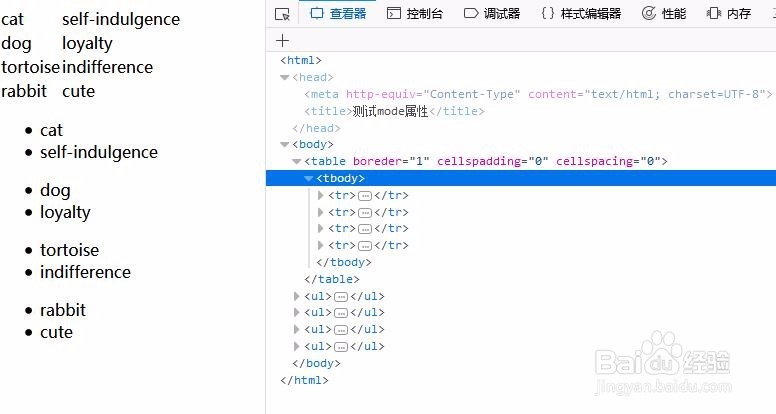
8、运行结果Html代码
<html>
<head>
<meta http-equiv="Content-Type" content="text/html; charset=UTF-8">
<title>测试mode属性</title>
</head>
<body>
<table boreder="1" cellspadding="0" cellspacing="0">
<tbody>
<tr>
<td>cat</td>
<td>self-indulgence</td>
</tr>
<tr>
<td>dog</td>
<td>loyalty</td>
</tr>
<tr>
<td>tortoise</td>
<td>indifference</td>
</tr>
<tr>
<td>rabbit</td>
<td>cute</td>
</tr>
</tbody>
</table>
<ul>
<li>cat</li>
<li>self-indulgence</li>
</ul>
<ul>
<li>dog</li>
<li>loyalty</li>
</ul>
<ul>
<li>tortoise</li>
<li>indifference</li>
</ul>
<ul>
<li>rabbit</li>
<li>cute</li>
</ul>
</body>
</html>