C# 如何添加Word脚注、尾注
1、下载并安装该类库后,在程序中引用Spire.Doc.dll(dll文件在安装路径下的Bin文件夹中获取)
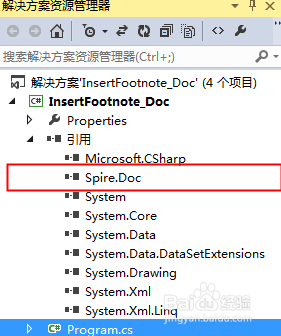
1、步骤1:添加using指令
using Spire.Doc;
using Spire.Doc.Documents;
using Spire.Doc.Fields;
using System.Drawing;
2、步骤2:新建一个word文档对象并加载需要添加脚注尾注的word文档
Document document = new Document();
document.LoadFromFile("sample.docx", FileFormat.Docx2010);
3、步骤3:获取第3个段落
Paragraph paragraph = document.Sections[0].Paragraphs[2];
4、步骤4:添加脚注
Footnote footnote = paragraph.AppendFootnote(FootnoteType.Footnote);
5、步骤5:查找指定字符串,并添加脚注
DocumentObject obj = null;
for (int i = 0; i < paragraph.ChildObjects.Count; i++)
{
obj = paragraph.ChildObjects[i];
if (obj.DocumentObjectType == DocumentObjectType.TextRange)
{
TextRange textRange = obj as TextRange;
if (textRange.Text == "中国——东盟自贸区框架")
{
//为添加脚注的字符串设置加粗格式
textRange.CharacterFormat.Bold = true;
//插入脚注
paragraph.ChildObjects.Insert(i + 1, footnote);
break;
}
}
}
6、步骤6: 添加脚注内容被设置字体格式
TextRange text = footnote.TextBody.AddParagraph().AppendText("2002年11月4日,朱镕基总理和东盟10国领导人共同签署了《中国-东盟全面经济合作框架协议》,这标志着中国与东盟的经贸合作进入了一个新的历史阶段。");
text.CharacterFormat.FontName = "Arial Black";
text.CharacterFormat.FontSize = 9;
text.CharacterFormat.TextColor = Color.DarkGray;
footnote.MarkerCharacterFormat.FontName = "Calibri";
footnote.MarkerCharacterFormat.FontSize = 12;
footnote.MarkerCharacterFormat.Bold = true;
footnote.MarkerCharacterFormat.TextColor = Color.DarkGreen;
7、步骤7:获取第5段落
Paragraph paragraph2 = document.Sections[0].Paragraphs[4];
8、步骤8:添加尾注并设置尾注和格式
Footnote endnote = paragraph2.AppendFootnote(FootnoteType.Endnote);
TextRange text2 = endnote.TextBody.AddParagraph().AppendText("党的十七大报告明确指出:"
+"“坚持对外开放的基本国策,把‘引进来’和‘走出去’更好地结合起来,"
+"扩大开放领域,优化开放结构,提高开放质量,完善内外联动,"
+"互利共赢、安全高效的开放型经济体系,形成经济全球化条件下参与国际经济合作和竞争的新优势。");
text2.CharacterFormat.FontName = "Arial Black";
text2.CharacterFormat.FontSize = 9;
text2.CharacterFormat.TextColor = Color.Black;
endnote.MarkerCharacterFormat.FontName = "Calibri";
endnote.MarkerCharacterFormat.FontSize = 12;
endnote.MarkerCharacterFormat.Bold = false;
endnote.MarkerCharacterFormat.TextColor = Color.DarkGreen;
9、步骤9:保存并打开文档
document.SaveToFile("添加脚注尾注.docx", FileFormat.Docx2010);
System.Diagnostics.Process.Start("添加脚注尾注.docx");
10、步骤10:完成以上代码后,调试运行程序,生成文件

1、using Spire.Doc;
using Spire.Doc.Documents;
using Spire.Doc.Fields;
using System.Drawing;
namespace InsertFootnote_Doc
{
class Program
{
static void Main(string[] args)
{
//新建一个word文档对象并加载需要添加脚注尾注的word文档
Document document = new Document();
document.LoadFromFile("sample.docx", FileFormat.Docx2010);
//获取第3个段落
Paragraph paragraph = document.Sections[0].Paragraphs[2];
//添加脚注
Footnote footnote = paragraph.AppendFootnote(FootnoteType.Footnote);
//从第一段开始查找指定字符串,并添加脚注
DocumentObject obj = null;
for (int i = 0; i < paragraph.ChildObjects.Count; i++)
{
obj = paragraph.ChildObjects[i];
if (obj.DocumentObjectType == DocumentObjectType.TextRange)
{
TextRange textRange = obj as TextRange;
if (textRange.Text == "中国——东盟自贸区框架")
{
//为添加脚注的字符串设置加粗格式
textRange.CharacterFormat.Bold = true;
//插入脚注
paragraph.ChildObjects.Insert(i + 1, footnote);
break;
}
}
}
//添加脚注内容被设置字体格式
TextRange text = footnote.TextBody.AddParagraph().AppendText("2002年11月4日,朱镕基总理和东盟10国领导人共同签署了《中国-东盟全面经济合作框架协议》,这标志着中国与东盟的经贸合作进入了一个新的历史阶段。");
text.CharacterFormat.FontName = "Arial Black";
text.CharacterFormat.FontSize = 9;
text.CharacterFormat.TextColor = Color.DarkGray;
footnote.MarkerCharacterFormat.FontName = "Calibri";
footnote.MarkerCharacterFormat.FontSize = 12;
footnote.MarkerCharacterFormat.Bold = true;
footnote.MarkerCharacterFormat.TextColor = Color.DarkGreen;
//获取第5段落
Paragraph paragraph2 = document.Sections[0].Paragraphs[4];
//添加尾注并设置尾注和格式
Footnote endnote = paragraph2.AppendFootnote(FootnoteType.Endnote);
TextRange text2 = endnote.TextBody.AddParagraph().AppendText("党的十七大报告明确指出:"
+"“坚持对外开放的基本国策,把‘引进来’和‘走出去’更好地结合起来,"
+"扩大开放领域,优化开放结构,提高开放质量,完善内外联动,"
+"互利共赢、安全高效的开放型经济体系,形成经济全球化条件下参与国际经济合作和竞争的新优势。");
text2.CharacterFormat.FontName = "Arial Black";
text2.CharacterFormat.FontSize = 9;
text2.CharacterFormat.TextColor = Color.Black;
endnote.MarkerCharacterFormat.FontName = "Calibri";
endnote.MarkerCharacterFormat.FontSize = 12;
endnote.MarkerCharacterFormat.Bold = false;
endnote.MarkerCharacterFormat.TextColor = Color.DarkGreen;
//保存并打开文档
document.SaveToFile("添加脚注尾注.docx", FileFormat.Docx2010);
System.Diagnostics.Process.Start("添加脚注尾注.docx");
}
}
}