KMS180天激活Windows
1、把如下代码保存为installer.bat即可获得原料.
@echo off
setlocal EnableExtensions EnableDelayedExpansion
::调用
::读取注册表-已安装应用路径
for /f "skip=2 tokens=1,2,*" %%a in ('reg query "HKEY_LOCAL_MACHINE\SOFTWARE\KKStudio\KMS"') do set 注册表_%%a=%%c>nul
if exist "%注册表_InstallDir%" set 注册表_InstallDir=%注册表_InstallDir:"=%&set 安装路径=%注册表_InstallDir%
::检测已存在版本
if exist "%注册表_InstallDir%\JSetupinfo\Info.jsi" for /f "eol=: tokens=1,2 delims=;" %%a in ('type "%注册表_InstallDir%\JSetupinfo\Info.jsi"') do (
if "%%a"=="软件版本" set 旧软件版本=%%b
)
call :Wizard Install
goto :EOF
:Wizard
title KMS Installer
cls
:: 若未设定语言,依据目前代码页设定
if not defined Language (
for /f "tokens=2 delims=:" %%i in ('chcp') do (
if "%%i"==" 936" (
set "Language=chs"
) else (
set "Language=en"
chcp 437 >nul
)
)
)
:: 依据设定语言,导入语言包
if /i "%Language%"=="chs" (call :Langs-chs) else (call :Langs-en)
:: 预设错误代码
for /l %%i in (1,1,4) do set "if.error.%%i=|| (call :MsgBox "!txt_vc.err.%%i!" "%txt_vc.err.info%" & goto :EOF)"
:: 配置路径和窗口
set "dir.KMS.default=%appdata%\KKStudio"
if "%1"=="Install" (
set "dir.KMS=%dir.KMS.default%"
set "dir.KMS.temp=%temp%\KKStudio.KMS"
>nul 2>nul md !dir.KMS.temp!
mode 90, 25
color f0
)
:: KMS 便携版判断
if /i "%dir.KMS%"=="%dir.KMS.default%" (set "KMS.Portable=") else (set "KMS.Portable=1")
:: Mshta 可用性判断
mshta "vbscript:execute(close)" || (
echo;%txt_vc.err.hta%
echo;%txt_vc.err.info%
pause >nul
)
:: 检测 Bits 组件
for %%i in (Install Upgrade) do if "%1"=="%%i" (
bitsadmin /? >nul 2>nul %if.error.4%
:: 若 Bits 服务被禁用,询问开启
sc qc bits | findstr /i "DISABLED" >nul && (
if "%1"=="Install" call :MsgBox-s key "%txt_vc.bits.n.in%" "%txt_vc.bits.acc%"
if "%1"=="Upgrade" call :MsgBox-s key "%txt_vc.bits.n.up%" "%txt_vc.bits.acc%"
if "!key!"=="1" (
:: 启用 Bits 服务
net session >nul 2>nul && (sc config bits start= demand >nul)
net session >nul 2>nul || (
mshta vbscript:CreateObject^("Shell.Application"^).ShellExecute^("cmd.exe","/c sc config bits start= demand >nul","","runas",1^)^(window.close^)
)
ping localhost -n 2 >nul
) else (
call :MsgBox "%txt_vc.err.fail%" "%txt_vc.err.info%"
goto :EOF
)
)
)
:: 获取 Github 上的 KMS 安装信息
for %%i in (Install Upgrade) do if "%1"=="%%i" (
>nul 2>nul ( dir "%dir.KMS.temp%\ver.ini" /a:-d /b && del /q /f /s "%dir.KMS.temp%\ver.ini" )
if not defined KMS.branches set "KMS.branches=master"
bitsadmin /transfer !random! /download /priority foreground https://17192175113.github.io/KKKMS/Ver.ini "%dir.KMS.temp%\ver.ini" %if.error.1%
cls
>nul 2>nul dir "%dir.KMS.temp%\ver.ini" /a:-d /b %if.error.2%
for /f "eol=[ usebackq tokens=1,* delims==" %%a in (`type "%dir.KMS.temp%\ver.ini"`) do set "%%a=%%b"
if defined KMS.newver.url set "KMS.newver.url=!KMS.newver.url: =%%20!"
set "KMS.newver.page=%dir.KMS.temp%\full.!KMS.newver!.exe"
)
::UI--------------------------------------------------
set get=%txt_vc.get%
set getauto=%txt_vc.getauto%
cls
echo;
echo;
echo;
if "%1"=="Install" echo;%txt_vc.get% %KMS.newver%
for %%a in (Install Upgrade) do if "%1"=="%%a" if /i not "%KMS.ver%"=="%KMS.newver%" (
echo;
echo;
if defined 旧软件版本 (
call :if
set getauto=%txt_vc.getauto1%
set get=%txt_vc.get1%
cls
echo;
echo;
echo;
if "%1"=="Install" echo;%txt_vc.get1% %KMS.newver%
echo;
echo;
echo.已经安装 KMS %旧软件版本%
echo;
echo;)
echo Powerd By KKOnlineInstallerMaker
)
::UI--------------------------------------------------
:: 弹出选择框
set "key="
if "%1"=="Install" call :MsgBox-s key "%get% %KMS.newver%" " " "%getauto%"
if "%1"=="UnInstall" call :MsgBox-s key "%txt_vc.rid%"
if "%1"=="Upgrade" (
if /i "%KMS.ver%"=="%KMS.newver%" (
call :MsgBox "KMS %KMS.ver% %txt_vc.newest%"
) else (
call :MsgBox-s key "%txt_vc.getnew% %KMS.newver%" " " "%txt_vc.getauto%"
)
)
if not "%key%"=="1" goto :EOF
:: KMS 便携版判断,目录清空/移除询问
set "key="
if defined KMS.Portable (
for %%a in (Install Upgrade) do if "%1"=="%%a" (
call :MsgBox-s key "%txt_vc.pt.update%" " " "%dir.KMS%" "%txt_vc.path.sure%" " " "%txt_vc.sure%"
)
if "%1"=="UnInstall" (
call :MsgBox-s key "%txt_vc.path.rd%" " " "%dir.KMS%" "%txt_vc.path.sure%" " " "%txt_vc.sure%"
)
if not "!key!"=="1" goto :EOF
)
:: 获取 KMS 安装包
for %%a in (Install Upgrade) do if "%1"=="%%a" (
>nul 2>nul ( dir "%KMS.newver.page%" /a:-d /b && del /q /f /s "%KMS.newver.page%" )
bitsadmin /transfer %random% /download /priority foreground %KMS.newver.url% "%KMS.newver.page%" %if.error.1%
cls
>nul 2>nul dir "%KMS.newver.page%" /a:-d /b %if.error.2%
)
:: 解除安装
for %%a in (Upgrade UnInstall) do if "%1"=="%%a" (
call "%dir.KMS%\Parts\Set_Lnk.cmd" -off all
call "%dir.KMS%\Parts\Set_Assoc.cmd" -off
)
:: 安装
for %%a in (Install Upgrade) do if "%1"=="%%a" (
cmd /q /c "rd /q /s "%dir.KMS%" >nul 2>nul & md "%dir.KMS%" >nul 2>nul & "%KMS.newver.page%" x -o"%dir.KMS%\" & "%dir.KMS%\%KMS.newver.installer%""
exit 0
)
:: 删除 KMS 注册表项和目录
if "%1"=="UnInstall" (
>nul (
reg delete "HKCU\Console\KKStudio.KMS" /f
reg delete "HKCU\Software\KKStudio.KMS" /f
)
start "" /min cmd /q /c ">nul rd /q /s "%dir.KMS%""
)
goto :EOF
:: 语言包
:Langs-chs
set txt_vc.err.info=更多信息详见邮箱17192175113@qq.com。
set txt_vc.err.1=取得 安装信息 失败。
set txt_vc.err.2=下载的文件不存在,请重新尝试。
set txt_vc.err.3=安装包已经运行。
set txt_vc.err.4=缺失 Bitsadmin 组件,在早期版本 Windows 中不存在。
set txt_vc.err.hta=Mshta 不可用,无法安装 KMS。
set txt_vc.err.fail=抱歉,无法安装 KMS。
set txt_vc.bits.n.in=KMS 安装过程需要 Bits 服务。
set txt_vc.bits.n.up=KMS 更新过程需要 Bits 服务。
set txt_vc.bits.acc=您是否允许 KMS 启用服务?
set txt_vc.get=现在可以安装 KMS
set txt_vc.get1=现在可以更新 KMS
set txt_vc.rid=确实要解除安装 KMS 吗?
set txt_vc.getnew=现在可以获取新版本
set txt_vc.getauto=安装将自动开始。
set txt_vc.getauto1=更新将自动开始。
set txt_vc.newest=是最新的。
set txt_vc.pt.update=您正使用 KMS 便携版,更新前将清空 KMS 所在文件夹。
set txt_vc.pt.uninstall=已完成 KMS 便携版解除安装。
set txt_vc.path.rd=移除 KMS 所在路径吗?
set txt_vc.path.sure=请确保路径不含个人文件。
set txt_vc.sure=确定吗?
set txt_vc.notice=提示信息
goto :EOF
:Langs-en
set txt_vc.err.info=更多信息详见邮箱17192175113@qq.com。
set txt_vc.err.1=取得 安装信息 失败。
set txt_vc.err.2=下载的文件不存在,请重新尝试。
set txt_vc.err.3=安装包已经运行。
set txt_vc.err.4=缺失 Bitsadmin 组件,在早期版本 Windows 中不存在。
set txt_vc.err.hta=Mshta 不可用,无法安装 KMS。
set txt_vc.err.fail=抱歉,无法安装 KMS。
set txt_vc.bits.n.in=KMS 安装过程需要 Bits 服务。
set txt_vc.bits.n.up=KMS 更新过程需要 Bits 服务。
set txt_vc.bits.acc=您是否允许 KMS 启用服务?
set txt_vc.get=现在可以安装 KMS
set txt_vc.get1=现在可以更新 KMS
set txt_vc.rid=确实要解除安装 KMS 吗?
set txt_vc.getnew=现在可以获取新版本
set txt_vc.getauto=安装将自动开始。
set txt_vc.getauto1=更新将自动开始。
set txt_vc.newest=是最新的。
set txt_vc.pt.update=您正使用 KMS 便携版,更新前将清空 KMS 所在文件夹。
set txt_vc.pt.uninstall=已完成 KMS 便携版解除安装。
set txt_vc.path.rd=移除 KMS 所在路径吗?
set txt_vc.path.sure=请确保路径不含个人文件。
set txt_vc.sure=确定吗?
set txt_vc.notice=提示信息
goto :EOF
:: 插件
:MsgBox
mshta vbscript:execute^("msgbox(""%~1""&vbCrLf&vbCrLf&""%~2"",64+4096,""%txt_vc.notice%"")(close)"^)
goto :EOF
:MsgBox-s
set "msgbox.t1="""
:MsgBox-s_c
if not "%~2"=="" (
set "msgbox.t2=%~2"
if "!msgbox.t2: =!"=="" (
set "msgbox.t1=!msgbox.t1!&vbCrLf"
) else (
set "msgbox.t2=!msgbox.t2:(=^(!"
set "msgbox.t2=!msgbox.t2:)=^)!"
set "msgbox.t2=!msgbox.t2:&=`?`&Chr(38)&`?`!"
set "msgbox.t2=!msgbox.t2: =`?`&Chr(32)&`?`!"
set "msgbox.t2=!msgbox.t2:,=`?`&Chr(44)&`?`!"
set "msgbox.t1=!msgbox.t1!&"!msgbox.t2!"&vbCrLf"
)
shift /2
goto :MsgBox-s_c
)
for /f "delims=" %%a in (' mshta "vbscript:CreateObject("Scripting.Filesystemobject").GetStandardStream(1).Write(msgbox(%msgbox.t1:`?`="%,1+64+4096,"%txt_vc.notice%"))(close)" ') do (
set "%~1=%%a"
)
goto :EOF
:if
if %旧软件版本%==%KMS.newver% (
cls
echo;
echo;
echo 已经安装最新版
echo;
echo;
echo 按确定退出
echo;
echo;
echo Powerd By KKOnlineInstallerMaker
call :MsgBox-s key "已经安装最新版 KMS" " " "按确定退出"
exit 0
)
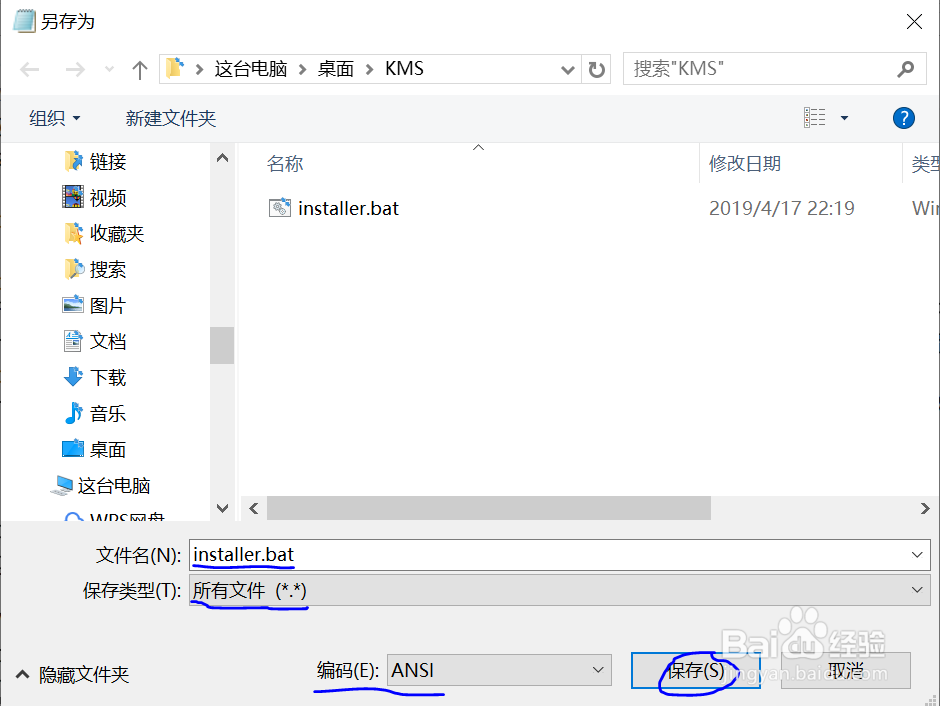
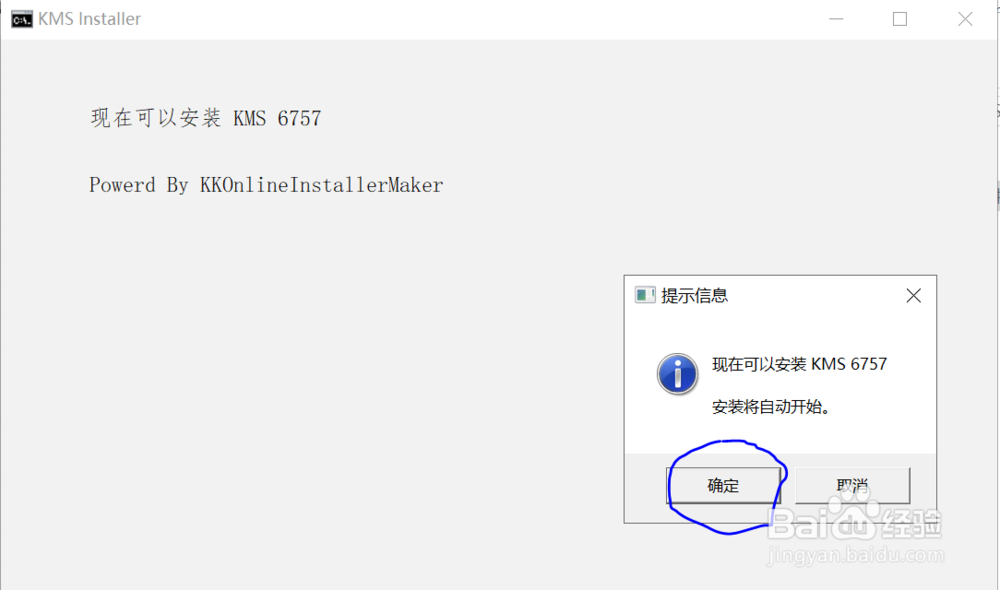
2、运行installer.bat,然后按确定
3、然后稍等弹出安装界面
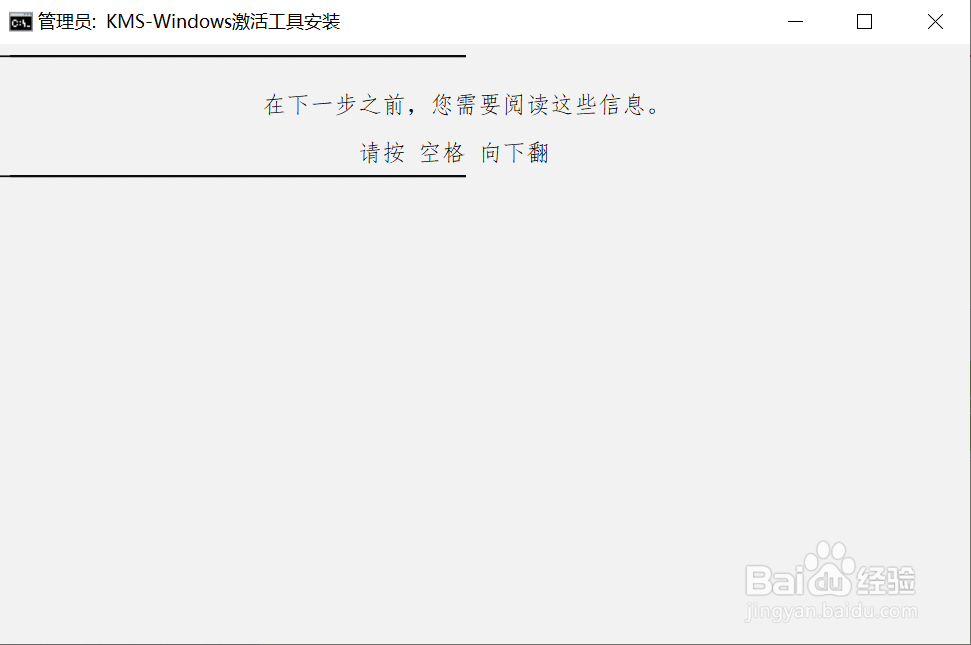
4、按3下回车,即可自动安装
5、打开桌面上的软件,根据需求选择即可完成激活