ssh命令登陆设备
1、树莓派连接网络
检查网络链接状态,是否ping通
ping www.baidu.com
2、启动ssh服务通过树莓派图形化配置文件菜单打开配置菜单
sudo raspi-config
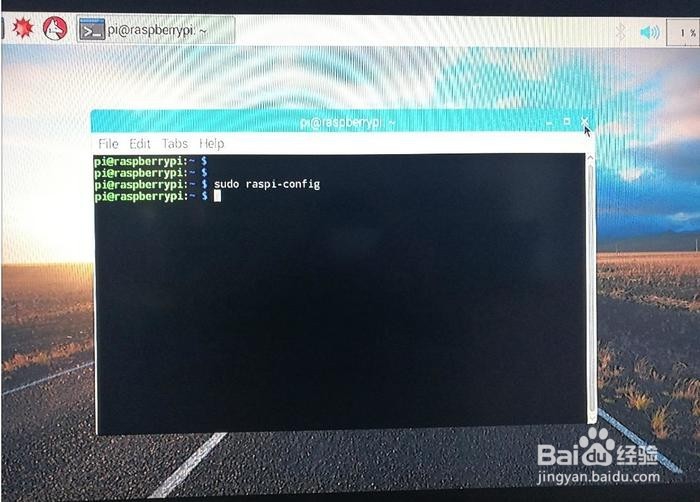
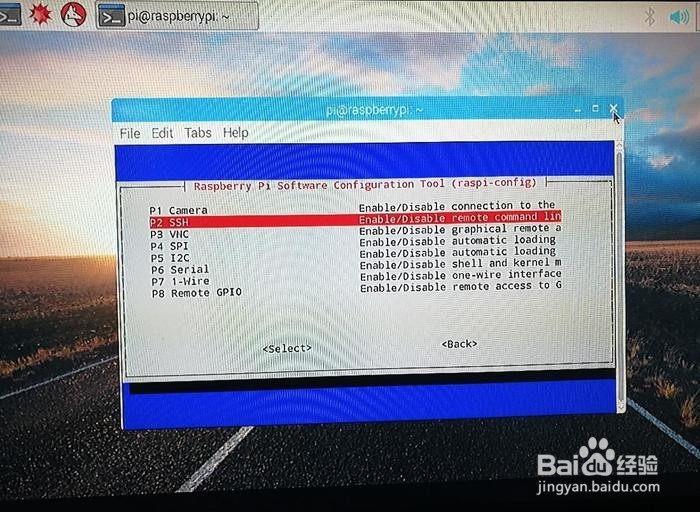
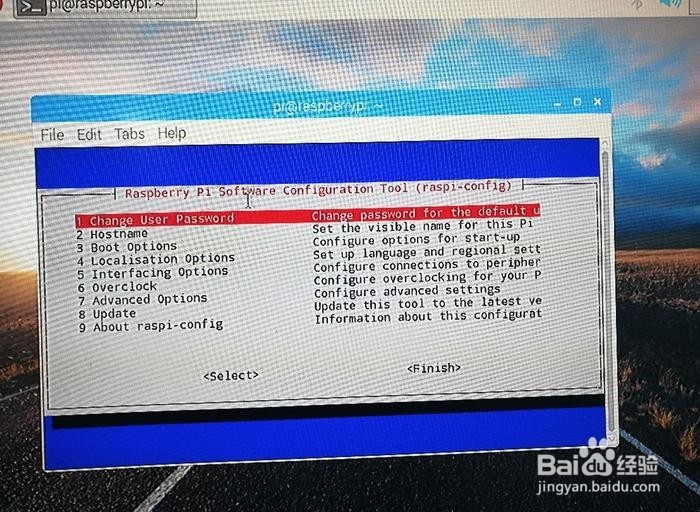
3、然后配置菜单项,选择第五项,敲击回车然后选择 SSH
Tab键可以用来选择"Yes" or "No",选择"Yes",敲击回车。第一次配置,pi会自动重启。
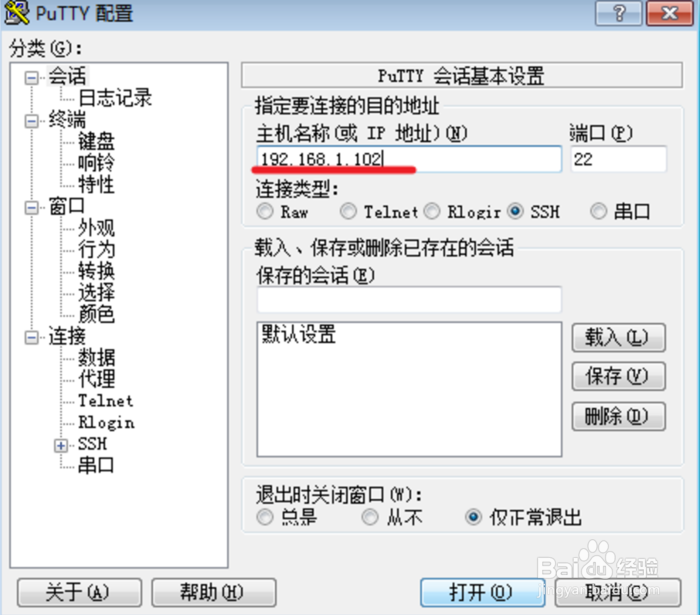
4、Window操作系统需要连接网络。下载PuTTy程序,无需安装,直接打开PuTTy运行
红色划线处输入你的树莓派的ip,其他选项默认。大部分人建议设置为静态IP,避免pi重启后被分配了新的IP。我使用的是动态的。默认情况家庭网络每个设备都会固定分配一个IP不会变。
5、打开,跳转到命令提示窗口,输入你的 pi的名字及pwd即可登录。遇到的问题:ssh登录时,一直提示time out。解决方法:根目录/下的boot目录,创建一个空间文件 touch ssh,重启pi就ok了。
ssh登录树莓派,命令行
ssh pi@192.168.1.199
localhost:~ name$ ssh pi@192.168.1.199
The authenticity of host '192.168.1.199(192.168.1.199)' can't be established.
ECDSA key fingerprint is SHA256:lhyK6WRHKHCQEXNuzgCm+97J6mx24WW/V4/xWIhuF88.
Are you sure you want to continue connecting (yes/no)? yes
Warning: Permanently added '192.168.1.199' (ECDSA) to the list of known hosts.
pi@192.168.1.1pp's password:
The programs included with the Debian GNU/Linux system are free software;
the exact distribution terms for each program are described in the
individual files in /usr/share/doc/*/copyright.
Debian GNU/Linux comes with ABSOLUTELY NO WARRANTY, to the extentpermitted by applicable law.Last login: Mon Apr 10 18:03:18 2017
pi@raspberrypi:~ $
警告你确实要登录192.168.1.199树莓派么yes输入密码进入树莓派
1、Mac系统预装有SSH程序,默认是ssh服务是关闭状态。
查看ssh服务状态
不需要输入密码
如果已经开启的话,指令会显示 "Remote Login: On",反之就会显示"Remote Login: Off"
方式一:
命令sudo launchctl list |grep ssh
localhost:/ wangliang$ sudo launchctl list |grep ssh
- 0 com.openssh.sshd
2、如上,说明ssh服务启动成功。
3、方式二:
命令sudo systemsetup -getremotelogin
ex:
localhost:~ xxx$ sudo systemsetup -getremotelogin
Password:
Remote Login: On
目前我的Mac ssh服务是开启状态!
4、关闭ssh服务
命令
sudo systemsetup -setremotelogin off
ex:
localhost:~ xxx$ sudo systemsetup -setremotelogin off
Password:
Do you really want to turn remote login off? If you do, you will lose this connection and can only turn it back on locally at the server (yes/no)? y
Do you really want to turn remote login off? If you do, you will lose this connection and can only turn it back on locally at the server (yes/no)? yes
localhost:~ wangliang$
5、启动ssh服务
方式一:
命令sudo systemsetup -setremotelogin on
方式二:
命令sudo launchctl load -w /System/Library/LaunchDaemons/ssh.plist
ex:
localhost:/ wangliang$ sudo launchctl load -w /System/Library/LaunchDaemons/ssh.plist
1、mac下ssh登录树莓派,拷贝树莓派上的文件到本地。
2、pi@xiaoxiao:/usr/share/nginx/html/yunchuang.zhijia.com$ scp php_mysql/ wangliang@192.168.1.101:/home/wangliang/
The authenticity of host '192.168.1.101 (192.168.1.101)' can't be established.
ECDSA key fingerprint is 2f:5a:78:03:9e:3a:52:c5:70:ea:70:a4:cf:23:3d:ba.
Are you sure you want to continue connecting (yes/no)? yes
Warning: Permanently added '192.168.1.101' (ECDSA) to the list of known hosts.
Password:
php_mysql: not a regular file
pi@xiaoxiao:/usr/share/nginx/html/yunchuang.zhijia.com$ scp php_mysql/ wangliang@192.168.1.101:~/
Password:
php_mysql: not a regular file
pi@xiaoxiao:/usr/share/nginx/html/yunchuang.zhijia.com$
3、注意这句php_mysql: not a regular file不是一个常规文件,说明目前还不能直接copy整个目录
pi@xiaoxiao:/usr/share/nginx/html/yunchuang.zhijia.com$ scp php_mysql/create_db.php wangliang@192.168.1.101:~/
Password:create_db.php
4、好了,一次copy一个文件。