怎么用wallpaper engine设置桌面动态时钟
1、打开steam后找到软件。
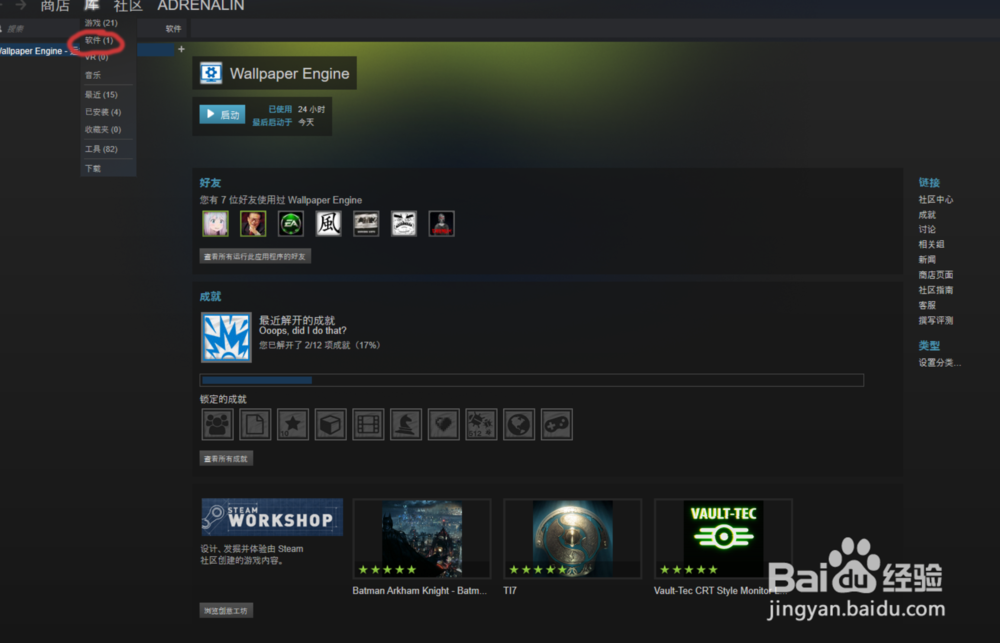
2、找到wallpaper engine。

3、点击浏览创意工坊。

4、在搜索栏里搜索clock。

5、会出来很多,选一个自己喜欢的。

6、点击订阅,订阅后会自动下载。耐心等下载完成就好了。

7、确定桌面壁纸正确后点确认保存壁纸。

声明:本网站引用、摘录或转载内容仅供网站访问者交流或参考,不代表本站立场,如存在版权或非法内容,请联系站长删除,联系邮箱:site.kefu@qq.com。
阅读量:167
阅读量:108
阅读量:170
阅读量:188
阅读量:177