unity中使用xml对数据进行增删查改
1、新建xml文件将xml文件放在assets文件目录下(根据你自己的需求建立对应的xml数据表)
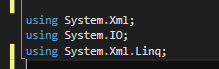
2、创建脚本开始时需引入一下命名空间(上面两个是使用xmlDocument 下面一个是使用XDocument的) 那么问题来了 为什么要用两个东西诶 这个问题问的好 哈哈 xmlDocument 在删除的时候没有办法把xml文件的子节点删除掉 只能够删除对应子节点的属性 但是XDocument 可以删除子节点本身
3、读取xml文件
public XmlDocument XmlRead() {
XmlDocument xmlD = new XmlDocument();
xmlD.Load(xmlPath);//读取xml文件
return xmlD;
}
//读取到后返回一个xml文件 然后对数据进行操作
4、向xml文件中添加数据
public void addXMLData(string number, string posx, string posy, string posz, string rotx, string roty, string rotz, string ssz, string type, string alarm, string plcNum, string remark, string boundName)//添加数据 {
string xmlPath = Application.dataPath + "/Ssz.xml"; //"C://Users//Administrator//Desktop//Ssz.xml";
if (File.Exists(xmlPath)) { //新建XML实例
XmlDocument xmlDoc = new XmlDocument();
xmlDoc.Load(xmlPath);//读取xml文件
//创建根节点
XmlNode root = xmlDoc.SelectSingleNode("Table");
// XmlElementas XmlElement;
// xmlDoc.CreateElement("Table"); //创建下一层节点 XmlElement elmNew = xmlDoc.CreateElement("sszTable"); //设置属性
elmNew.SetAttribute("number", number);
elmNew.SetAttribute("posx", posx);
elmNew.SetAttribute("posy", posy);
elmNew.SetAttribute("posz", posz);
elmNew.SetAttribute("rotx", rotx);
elmNew.SetAttribute("roty", roty);
elmNew.SetAttribute("rotz", rotz);
elmNew.SetAttribute("ssz", ssz);
elmNew.SetAttribute("type", type);
elmNew.SetAttribute("alarm", alarm);
elmNew.SetAttribute("plcNum", plcNum);
elmNew.SetAttribute("remark", remark);
elmNew.SetAttribute("boundName", boundName);
elmNew.SetAttribute("del_flag", "0");
root.AppendChild(elmNew);
xmlDoc.AppendChild(root);
xmlDoc.Save(xmlPath);
Debug.Log("createXml ok!");
}
}
//根据需求添加对应数据 添加完成后得到一下结果

5、xml文件删除 在文件删除的时候也可以用xmldocument删除 只不过删除后的数据会变为这个样子
<?xml version="1.0" encoding="utf-8"?><Table> <sszTable number="5" posx="85.53907" posy="6.971593E-06" posz="-64.54948" rotx="0" roty="0" rotz="0" ssz="0.002" type="type3" alarm="0" plcNum="sdasd" remark="asdf" boundName="对象850" del_flag="0" /> <sszTable /></Table>
无法将子节点删除 只能删除对应的属性
所以在这里我们使用XDocument
public void DeleteXml(string id) {
if (File.Exists(xmlPath)) {
XDocument xmlDoc = XDocument.Load(xmlPath);
XElement rootNode = xmlDoc.Element("Table");
foreach (XElement xe in rootNode.Elements("sszTable")) {
if (xe.Attribute("number").Value == id) {
xe.Remove();//linq解析这里居然可以直接删除自己,好方便
}
}
xmlDoc.Save(xmlPath);
}
}
删除后的结果
<?xml version="1.0" encoding="utf-8"?><Table> <sszTable number="5" posx="85.53907" posy="6.971593E-06" posz="-64.54948" rotx="0" roty="0" rotz="0" ssz="0.002" type="type3" alarm="0" plcNum="sdasd" remark="asdf" boundName="对象850" del_flag="0" /></Table>
6、xml数据查询
public void findXmlById(string id,BJlabeClick obj) {
if (File.Exists(xmlPath)) {
XmlDocument xmlDoc = new XmlDocument();
xmlDoc.Load(xmlPath);
XmlNodeList nodeList = xmlDoc.SelectSingleNode ("Table").ChildNodes;
foreach (XmlElement xe in nodeList) {
if (xe.GetAttribute("number") == id) {
float posx =float.Parse(xe.GetAttribute("posx")) ;
float posy = float.Parse(xe.GetAttribute("posy"));
float posz = float.Parse(xe.GetAttribute("posz"));
obj.posx = posx;
obj.posy = posy;
obj.posz = posz;
}
}
}
}
BJlabeClick是另外一个脚本 把他查询到的值赋给对应的地方就可以 了