Java 读取Word中的脚注、尾注
1、方法1:通过e-iceblue官网下载。下载后,解压文件,并将lib文件夹下的Spire.Doc.jar文件导入到java程序。
2、方法2:可通过maven仓库安装导入。
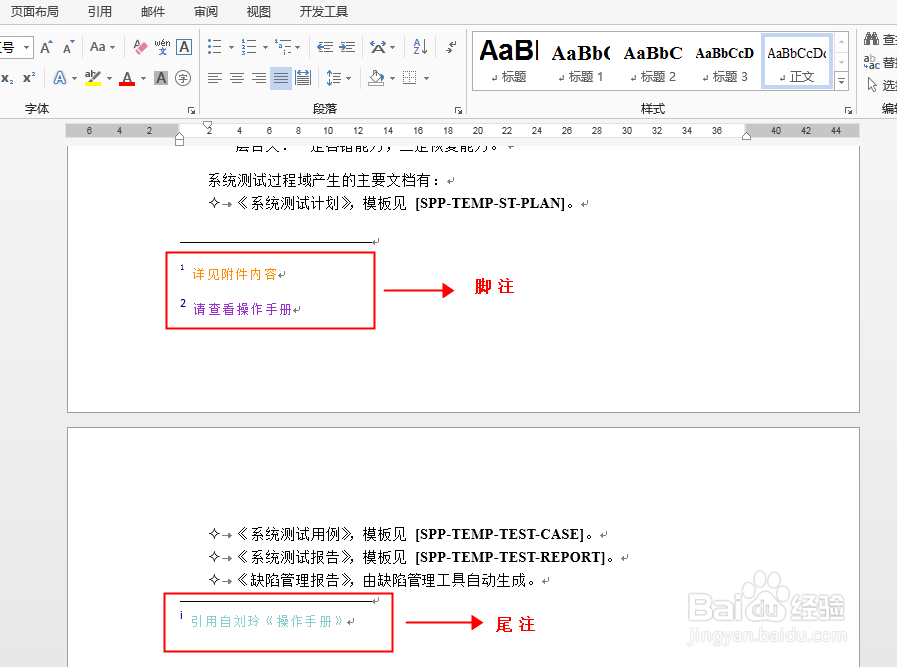
3、测试文档中的脚注、尾注如下:
1、import com.spire.doc.*;
import com.spire.doc.documents.Paragraph;
import com.spire.doc.fields.Footnote;
import com.spire.doc.fields.TextRange;
import java.util.List;
public class ExtractFootnoteAndEndnote {
public static void main(String[] args) {
//创建Document实例
Document doc = new Document();
doc.loadFromFile("test1.docx");
//获取文档中的所有脚注
List<Footnote> footNotes = doc.getFootnotes();
//实例化String类型变量
String str = "";
//遍历脚注
for (Footnote footNote :footNotes) {
//遍历脚注中的段落
for (int j = 0; j < footNote.getTextBody().getParagraphs().getCount(); j++) {
Paragraph paragraph = footNote.getTextBody().getParagraphs().get(j);
//遍历段落中的对象
for(Object object : paragraph.getChildObjects()){
//读取文本
if (object instanceof TextRange) {
TextRange textRange = (TextRange) object;
str = str + textRange.getText();
}
}
}
}
//输出脚注文本
System.out.println(str);
}
}
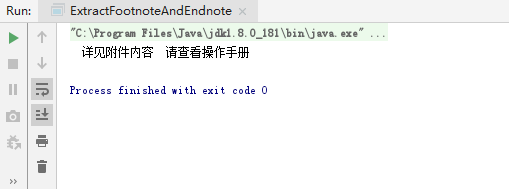
2、脚注读取结果:
1、import com.spire.doc.*;
import com.spire.doc.documents.Paragraph;
import com.spire.doc.fields.Footnote;
import com.spire.doc.fields.TextRange;
import java.util.List;
public class ExtractFootnoteAndEndnote {
public static void main(String[] args) {
//创建Document实例
Document doc = new Document();
doc.loadFromFile("test1.docx");
//获取所有尾注
List<Footnote> endNotes = doc.getEndnotes();
//实例化String类型变量
String str = "";
//遍历尾注
for (Footnote endnote :endNotes) {
//遍历尾注中的段落
for (int j = 0; j < endnote.getTextBody().getParagraphs().getCount(); j++) {
Paragraph paragraph = endnote.getTextBody().getParagraphs().get(j);
//遍历段落中的对象
for(Object object : paragraph.getChildObjects()){
//读取文本
if (object instanceof TextRange) {
TextRange textRange = (TextRange) object;
str = str + textRange.getText();
}
}
}
}
//输出尾注文本
System.out.println(str);
}
}
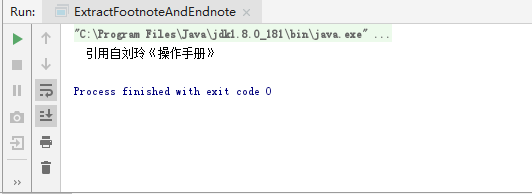
2、尾注读取结果:
声明:本网站引用、摘录或转载内容仅供网站访问者交流或参考,不代表本站立场,如存在版权或非法内容,请联系站长删除,联系邮箱:site.kefu@qq.com。
阅读量:103
阅读量:160
阅读量:122
阅读量:181
阅读量:52